Reflection 4: PSII

This week, we visited the Pacific School of Innovation and Inquiry downtown Victoria. Jeff Hopkins, Principal and Teacher at PSII, spoke with us briefly about the school’s foundational approach, values, programs, and day to day.

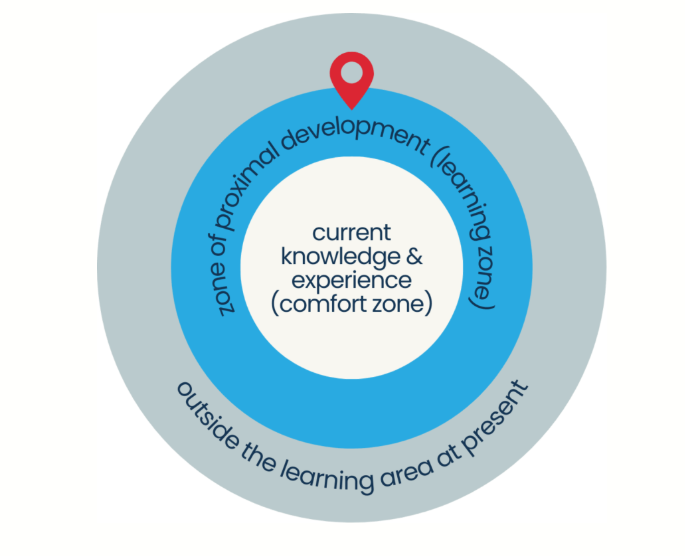
Essentially, PSII is an operating independent school, open to students from grades 9 through 12. It is entirely inquiry-based, drawing from Vygotsky’s zone of proximal development (ZPD), which encourages students to question, grow, and continually deepen their learning. Students at PSII have the ability to earn credits for science, math, language, PHE, arts, and social studies courses through individual inquiry based projects. PSII encourages its’ students to learn predominantly in an emergent manner – uncovering their learning needs as they inquire – while also meeting BC curriculum requirements.
Overall, it was fascinating to hear about and explore the school campus. The building has a small science lab, large art studio, and several individual classrooms and group study spaces. Jeff shared many success stories and individual student projects, including learning novel languages, opening a nail salon, and pursuing accelerated learning at UVic. I think that an inquiry-based school like PSII would be extremely beneficial for some learners, and several elements of PSII’s structure would be helpful for all learners. For example I believe frontloading inquiry, notably in the field of science, is a critical step for students heading into post-secondary science. I appreciated PSII’s value of student questioning, encouraging independent thought and taking time to teach students how to conduct research. I hope to apply these elements to my own classroom some day.

On the contrary, PSII does cost students approximately $8000 per student, which makes it inaccessible for some learners. Students are not able to participate in all high school sports due to the smaller school population, rendering only individual, pair, or trio style sports an option for students. Students would also miss out on school-wide events such as dances, spirit days, etc. or large group classes such as concert band. PSII’s website does mention some student camping trips, which provides a parallel option to typical public school classes such as outdoor pursuits. Finally, students do not experience a structured, block system, which I believe has benefits and disadvantages alike. The freedom to self-direct their learning is an extremely valuable skill, while following a block system also offers a learning opportunity for students who will be working highly structured, shiftwork style jobs.

Overall, PSII had several amazing programs to offer, and provided lots of valuable insight concerning inquiry-based learning, despite some differences and potential downsides.

Images were screenshotted from the Pacific School of Innovation and Inquiry‘s website, and downloaded from UnSplash.
Free Inquiry 2: YYJ

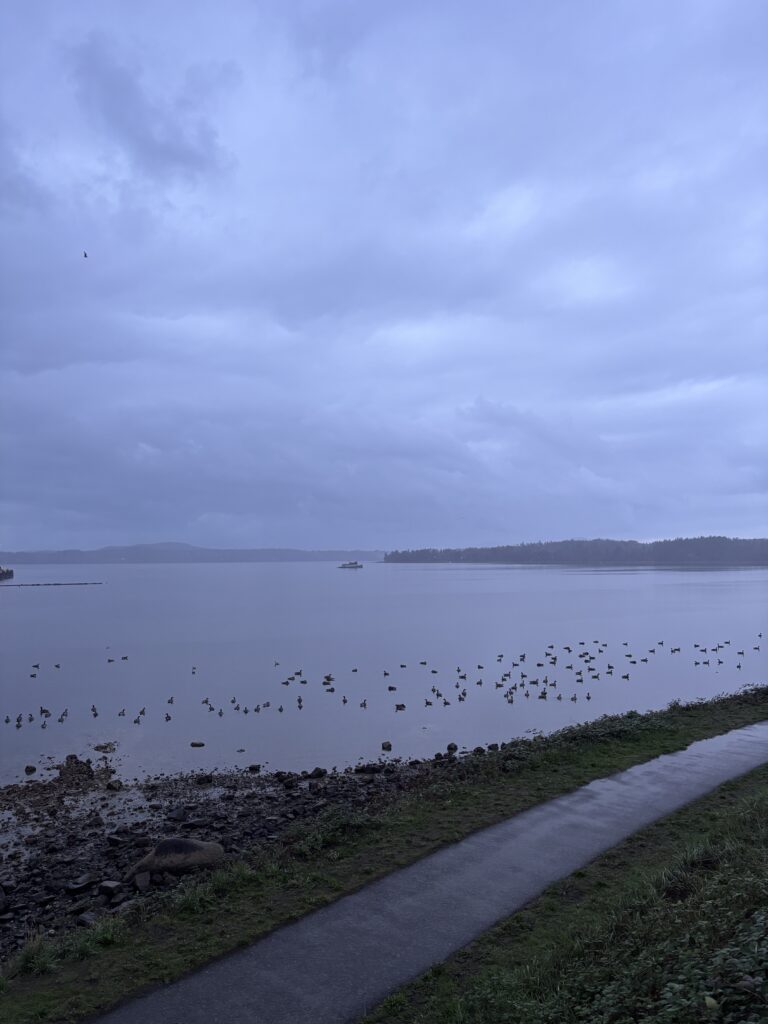
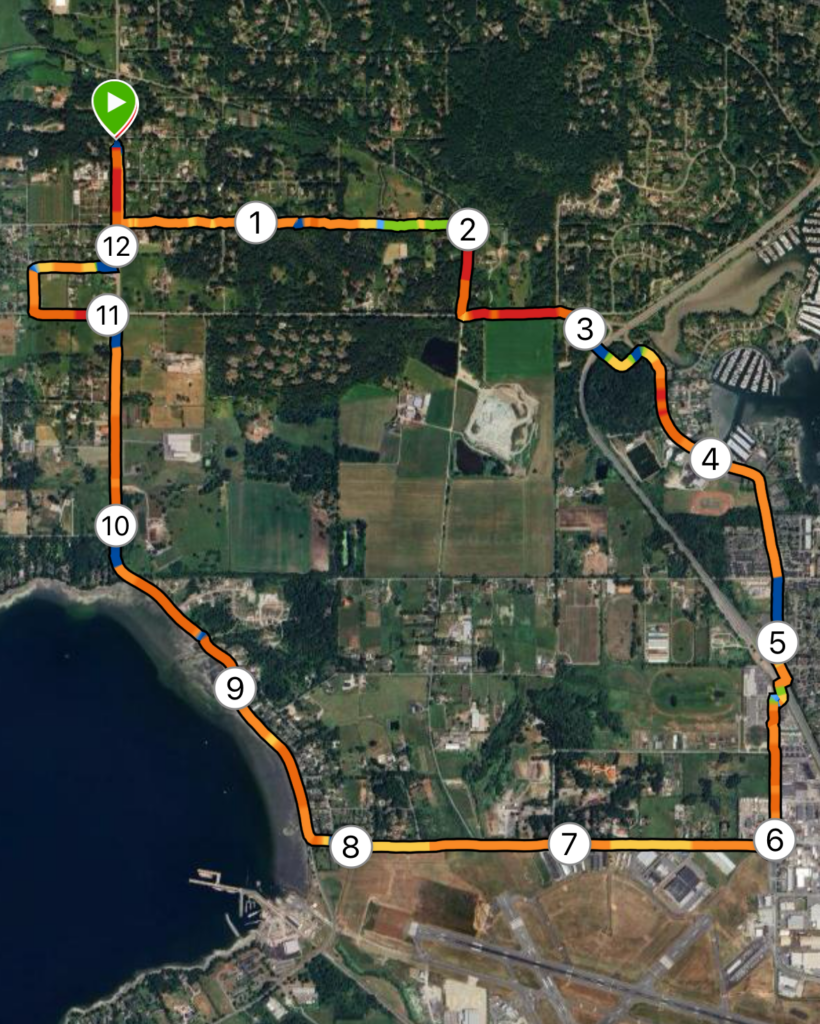
Map: This week, my route was located in North Saanich, extending from Deep Cove out towards the Victoria International Airport (YYJ). Shown left is satellite map generated by Garmin, showing km markers overlayed by a heatmap – red and orange depict flat and level terrain, while green and blue depict steeper, inclined terrain.

Terrain: The majority of this run was road base, with small sections of chip or gravel trail. With the exception of Tatlow Rd and the lower section of Wain Rd, all roads included a bike lane, providing space away from traffic.

Distance/Elevation: The total distance of this route was 12.45km, which equated to 1h6m. Total ascent across this distance was 118m, while descent was 98m, with a maximum elevation of 64m; Overall, very flat.

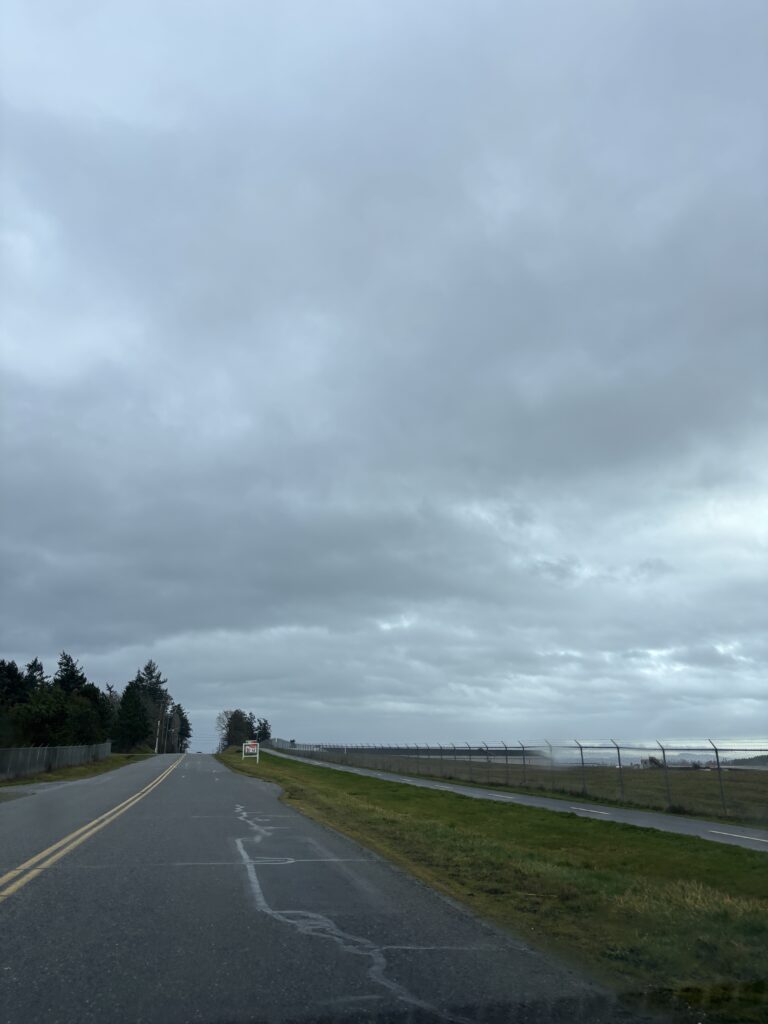
An Honest and Thorough Review: This loop provided a decent, quiet, continuous loop with moderate mileage. Though predominantly pavement, bike lanes and road shoulders helps avoid the feeling of running directly on the road or through busy traffic. I managed to go for this run around lunchtime on a weekday, which was also likely a period of low traffic since as I avoided heavy commute times. Despite not being a scenic trail, the route provided some nice views of the Sidney Harbour, Patricia Bay, and some of the local farms. Though the day I went was quite cloudy, it would also provide a fairly equal balance of sun and shade, which would be an important consideration while repeating this run in the summer months. Overall, I would say this loop is perfect for a comfortable, mid-distance run to be completed outside of rush hour. It would not be a good fit for a group session or fast-paced tempo or time trial run, given the number of crosswalks and single file bike lane or shoulder paths.

Rating: 4 /5

Media:

Reflection 3: Generative AI

This week, we discussed the applications and implications of Generative AI. Initial discussion surrounded the notion that information provided by GenAI may not always be reliable, and the consequences of neglecting to fact-check generated information or examine references GenAI has chosen may be severe when one is using this information in a career or professional space. From a student perspective, we discussed that GenAI is now becoming a quick go-to resource for studying, completing assignments, writing papers, and creating projects. We discussed certain assignments, such as standard five-paragraph essays, reading summaries, worksheets, multiple choice open-book quizzes, lab reports, or biography reports are easily deciphered by GenAI and have high potential to generate quality output. Other forms of assignments, such as personal reflections, specific analyses, presentations, creative writing or project work, interviews, collaborative work, or any oral or in-class work are more difficult for students to run through GenAI and receive quality output. Final discussion surrounded the ethical issues surrounding the use of AI; data privacy, cultural and geographical biases, generational access, critical thinking skill development, and environmental impacts are all serious issues concerning the rising uses of GenAI.

Major Limitations of AI

One of the major limitations of AI include lack of reliability. As educators using GenAI to assist or generate lesson plans, our role becomes quite comprehensive in verifying validity of claims, references, and the material produced. This process can be time consuming, and to some surpasses the point of bothering to use AI in the first place. Using GenAI to create teaching tools offers a wide variety of exciting opportunities but also requires a commitment to verifying work and personalizing lessons plans before teaching. In addition to potential misinformation, generating lessons strictly using AI has been shown to offer low engagement instruction and activities, and neglected to include diverse perspectives and people (Trust et al, 2025). Additionally, there remains the issue of data privacy, as recent studies have revealed storage of personal information, including student numbers, health data, passwords, or social security information is often an issue when GenAI tools are used without discretion (National Education Association, 2025).

How well does GenAI do with Secondary Science?

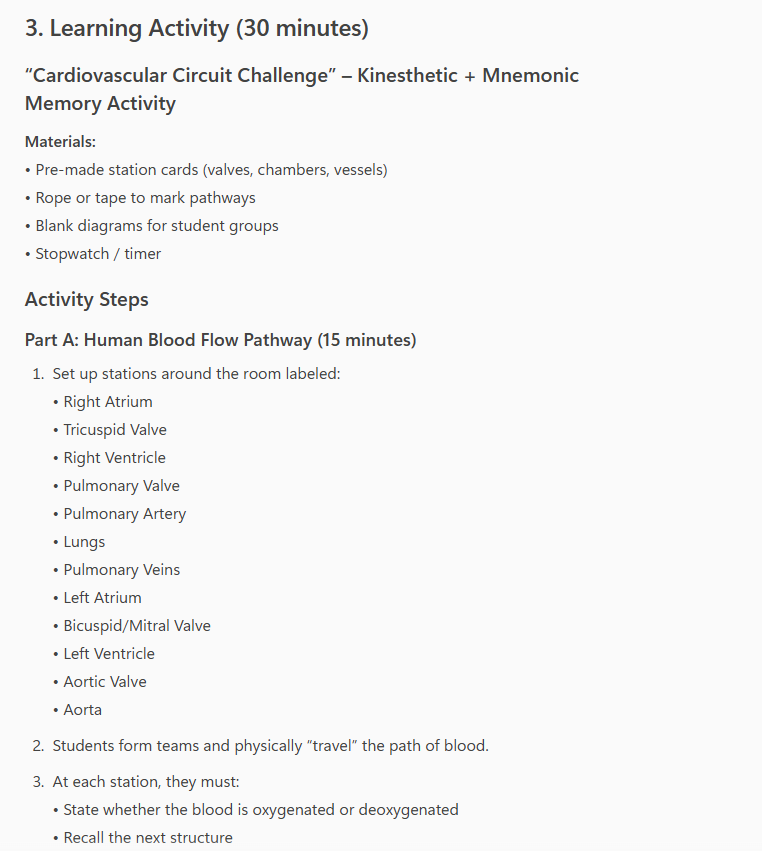
To explore potential uses for GenAI in my teaching area, I asked Microsoft CoPilot to do some analysis and content generation for Anatomy and Physiology 12. Focusing on the cardiovascular systems unit, I entered the following prompt: “Please generate a lesson plan for a 1hr lesson about the cardiovascular system including a 30min activity to help Canadian Anatomy and Physiology 12 students remember what they learned in the instruction portion of this lesson”.

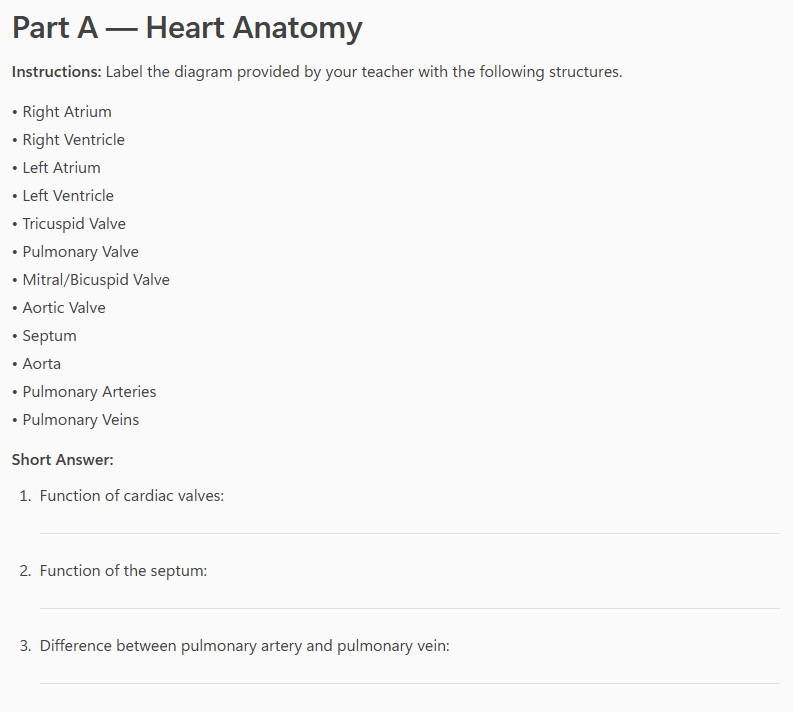
CoPilot presented me with 25min of direct instruction outlining anatomy, blood flow, and types of blood vessels, and purpose of the cardiovascular system. Next, was a learning activity outlining pre-made station cards, with which students would build a physical pathway on the floor and “walk” the path of a red blood cell through the heart. Finally, a diagram labelling activity was suggested to conclude the class. I also asked CoPilot to generate a worksheet for this content, that I would be able to handout to students.

Overall, I think the skeleton of this lesson plan isn’t horrible. A short lesson followed by 35min of interactive learning is a solid start. The learning activities include elements of kinesthetic and visual learning, which I like, and includes a good amount of key vocabulary. There was no evident misinformation.

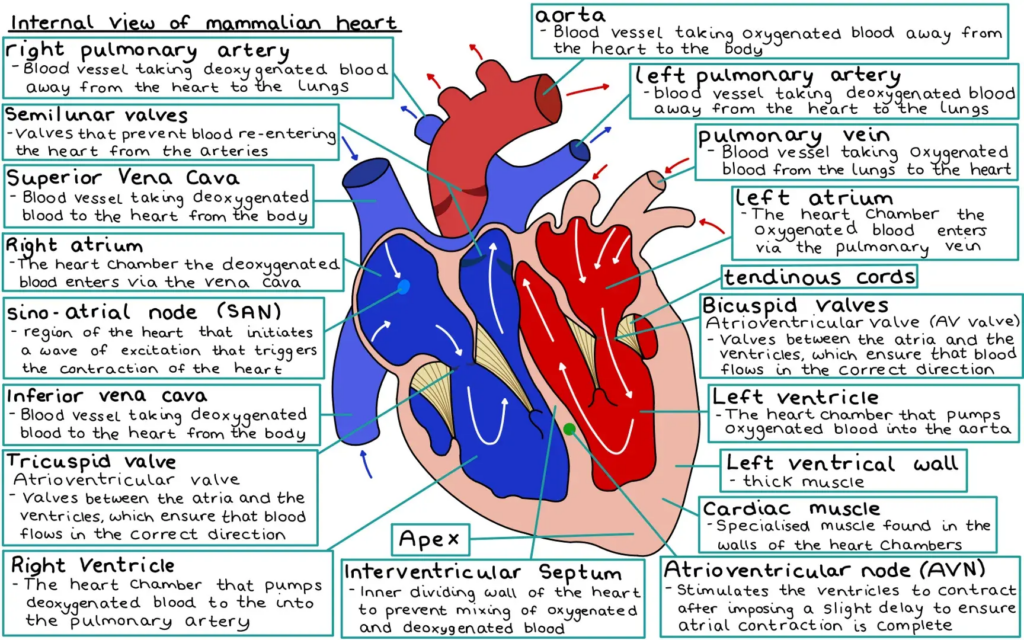
However, what was very apparent to me that was lacking from this lesson – depth, critical thinking, and visuals. Learning cardiovascular anatomy requires a solid understanding of where structures are, not simply their names. Further, the anatomical structures CoPilot listed, though correct, left out key players such as papillary muscles, atrioventricular bundle, SA and AV nodes, as well as carotid, brachial, and subclavian arteries, and R/L directionality applied when labelling. Without a strong visual component to this lesson (not provided by AI), students would be left royally confused about where each of these structures are located, which also affects their ability to understand their function. The questions posed in the worksheet did not comprehensively grasp upper level Bloom’s Taxonomy style questions, inquiring only about explicit function or differences. Questions such as “IF the atrioventricular valve was defective, WHAT would the IMPACT on blood flow be?” offer an element of critical thinking and require an understanding of anatomical structure and function.

A diagram such as the one below, depicts more depth and appropriately labelled structures. Overall, I think that GenAI offered a solid foundation for building a cardiovascular system lesson, lacking primarily in depth, critical thinking questions, and visual aids.

All images were generated using individual screenshots of Microsoft CoPilot, or provided publicly from Knowunity.

References

National Education Association. (2025). Student and Educator Data Privacy | NEA. Nea.org. https://www.nea.org/professional-excellence/student-engagement/tools-tips/student-and-educator-data-privacy

‌Trust, T., Maloy, R., Xu, C., & Pelletier, K. (2025). Civic education in the age of AI:
Should we trust AI-generated lesson plans? Contemporary Issues in Technology
and Teacher Education, 25(3), 418-442.

Free Inquiry 1: Happy Trails

I have decided to devote this semester of free inquiry to acquiring a comprehensive list of well-rated, thoroughly critiqued running routes. I have chosen the general area from Goldstream to Swartz Bay, to give myself a wide range of terrain including roads, coastal and hiking trails.

My primary goal in pursuing this project is to break my boredom and frustration with my current running routes – some of which I love, but many of which are getting old. Lately, I have found myself so stuck in my busy schedule that I simply avoid new trails without a concrete idea of how long they are, what the terrain is like, and how much shelter they offer from our ever-rainy weather. By the end of this semester, I hope to have gathered enough routes to categorize by distance, terrain, and overall experience. This leads me to my second inquiry goal, which is to be able to share this data with friends. I hope to generate something useful for others, to enable them to also explore local areas on foot, whether running or hiking. Overall, this is both a fitness and community based goal through which I hope to explore the beauty of the W̱SÁNEĆ and Lekwungen territory, and simultaneously gather useful data.

To begin, I will be using a combination of Google Maps, Strava, and AllTrails to conduct route research, and my Garmin Venu to track my routes. I will be using my phone to gather media from each route. Another great resource I will be using conduct research and build my routes from is RunVictoria, which provides several road routes from Swartz Bay to downtown, ranging from 9km or less to 17km+.

My weekly posts will look something like this:

(A photo from the route)

Map: Strava and/or Garmin map to depict chose route.

Terrain: review and classification of the route’s terrain, noting elevation, trail or road base, etc.

Distance/Elevation: km distance and m elevation statistics.

An Honest and Thorough Review: further comments on the route, including both vehicle and foot traffic, accessibility, scenic elements, flow, structure, and overall feel.

Rating: a rating out of 5, using the following scale.

1 = Poor, would not run again.

2= Adequate, not likely to be a regular run.

3= Good, few complaints, got the kms in, proposed alterations.

4= Great, would run again and recommend to a friend.

5= Fantastic, fun kms, would repeat solo and with friends!

Photos were obtained and downloaded through UnSplash.

Reflection 2: Screen-casting and MML

Learn how to perform basic data manipulation in excel using this screen-casted tutorial video!

This week, we used H5P tools to create an interactive video. This software enables you to add elements such as digital visuals, multiple choice questions, or labels to a screen-casted video. Using these tools, I created a video demonstrating a basic percentage calculation in Excel. A solid understanding of the functions and tools in a program such as Excel is a necessary skill for students entering the field of science, or math, as it is used frequently to gather and synthesize raw data. Providing students with a screen-casted video tutorial is exceptionally useful, as it provides a visual alongside step-by-step instructions. With H5P, I was able to pause the video and add a multiple choice question to encourage students to reflect on the data they calculated. At this point, they are also checking their work to ensure they have obtained the correct answer. Though I didn’t include these elements in this video, I appreciate how H5P also offers a digital visual for your cursor or labels; one would be able to highlight crucial elements of a diagram, or website, for example. I could anticipate this being highly productive in my future science classes while trying to guide students through a website or diagram. Overall, I think including H5P tools would certainly be potentially useful for creating video tutorials for students. For senior science and math classes (Grades 11-12), using H5P to walk students through Excel, a lab procedure, or a project template would likely be effective. Providing a posted video tutorial also enables students to return and re-watch the tutorial on their own time, which makes the content accessible to different learning speeds and styles.

The Multimedia Learning Theory (MML) proposes that visual media (images, videos) in conjunction with text content significantly boosts learning compared to text alone (Pastore, 2018). Essentially, MML supports the notion that better learning occurs when students engage in dual-coding information (ex. verbal and visual), are not overwhelmed with content or information, and are actively involved in the learning process (Digital Learning Institute, 2023). It outlines numerous principles for multimedia content, including provision of coherent visuals that cue learners to draw appropriate connections, without presenting redundant information. It also discusses the importance of spatial and temporal distribution of material, where text and or verbal instruction are closely connected to visuals, and the importance of tailoring or personalizing content to a specific audience, to name a few. Overall, I think these principles are key to construction of lesson plans for secondary teachers, who often use technology by way of PowerPoints, slides, or videos to convey content. Designing lessons in a manner that promotes learning for all students includes careful planning of multi-media resources, and using tools such as H5P to do so. By incorporating some of the MML principles underlined above, educators can create more effective instructional lessons, tutorials, and videos.

References

Digital Learning Institute. (2023, July 18). Mayer’s 12 principles of multimedia learning . Digital Learning Institute. https://www.digitallearninginstitute.com/blog/mayers-principles-multimedia-learning

‌Pastore, Ray. [Ray Pastore, Ph.D.]. (2018, August 16). What is Multimedia Learning? What is Multimedia?. YouTube. https://www.youtube.com/watch?v=g-sknUVq1mk

Reflection 1: Successful Education?

At the beginning of this week’s lecture, we discussed standout points from Most Likely To Succeed (2015), a documentary covering the pedagogical structure of High Tech High, a high school in San Diego, California. A major component of this school’s innovative program enables its students to drive their own learning, pursuing inquiry projects to later be showcased and shared with community and family members at the end of the year. The positivity surrounding this unique curriculum structure brings forth a lot of considerations concerning BC’s (and most of North America’s) more conventional education models – are they successful?

Do we need to reimagine education? In a sense, I think education should be continually reimagined. Our world is constantly changing locally and globally, which means that our curriculums should also. I believe it is a teachers’ responsibility to establish growth mindset concerning all aspects of their work. This means we should be assessing and evaluating our students’ success on a semester to semester, year to year basis. In terms of the documentary, I think that our current BC curriculum could afford to be more inquiry-based. I think many students would find the transition from high school to university less stressful, given the chance to pursue individual projects with the close support of classmates and teachers at the high school level.

What obstacles to educators face when they try to change pedagogy? That being said, change often requires overcoming barriers. Something I noticed when the curriculum shifted away from standardized testing and letter grades ten years ago was a lot of pushback from teachers, students, and even parents. I think province-wide change is significant. Many parents are very invested in their teens’ school success, and had a difficult time accepting a new grading system. Many teachers struggled with implementing new numeracy and literacy assessments. It brought forth more work, time, and communication with parents and students, which can be challenging.

What concerns you and/or excites you about this approach? Along the same lines of the innovative approach at High Tech High, Jeff Hopkins’ Ted Talk describes a new approach to learning as ‘knowing rather than knowing about’. This perspective of teaching and learning excites me because I think that every teen holds incredible potential to be passionate about something, with a desire to fully know and comprehend it. What motivates me is when I see teachers (or even professors, at the university level), enabling students to pursue their passions. The teachers who provided an opportunity for me to do so left significant impacts on my life.

To wrap up this week’s reflection, the following questions persist for me. How can we construct a classroom that promotes inquiry based learning that encourage our students to truly know things while still covering content outlined by the BC curriculum? In what ways does the BC curriculum still need to shift? What does ‘successful’ pedagogy truly look like and will we ever attain it? Or simply – must we be open and excited about constant growth and change.